 Accounting Flow
Two ways to put work on the board
Some jobs are identical every quarter. Some need a judgement call. AccountingFlow now has a way to automate each, and neither needs a developer.
There are two kinds of recurring work in a practice, and treating them the same way is why automation projects stall.
The jobs that are always the same
A VAT quarter is a VAT quarter. Set up a task template once — the job, its checklist, its deadline rule — and every client who buys that service gets it, on time, with the checklist attached in the right order. Nobody creates next quarter's jobs by hand, and nobody forgets a client.
The jobs that need a decision
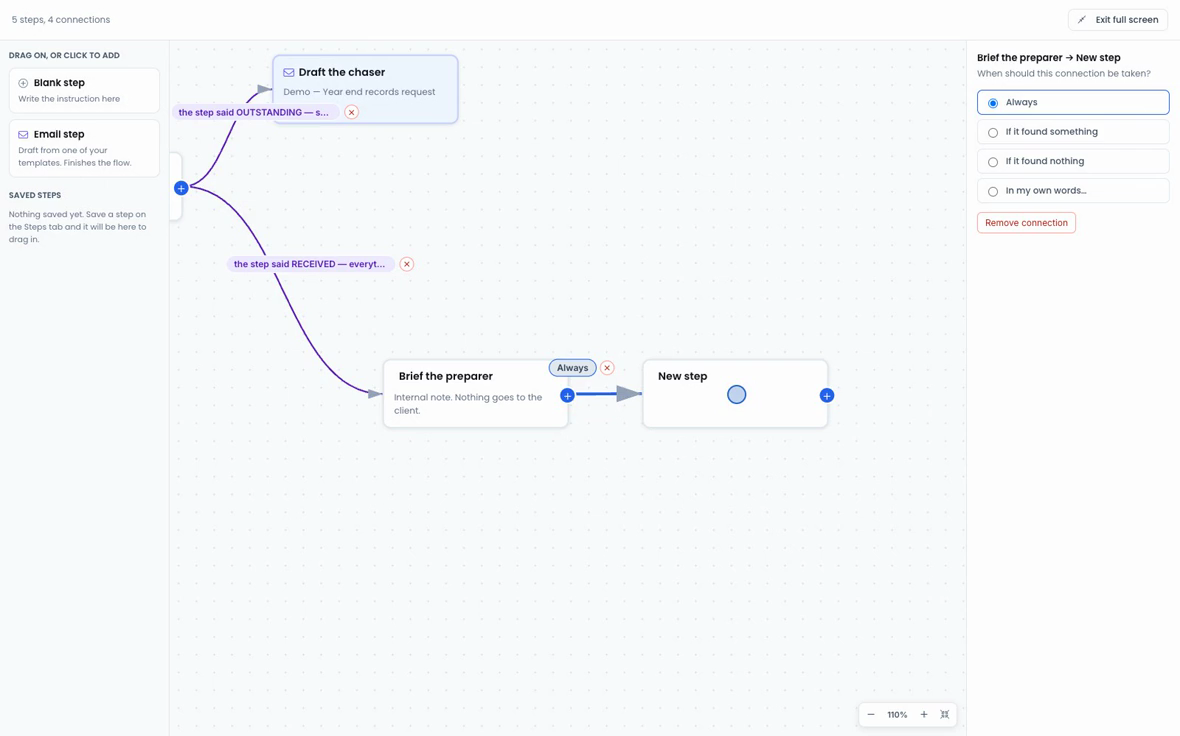
Chasing records is not the same for every client, which is why a rigid template never worked for it. For that, you draw an agent on a canvas: give it a filter of clients to work through, and let it decide case by case.
Every connection between steps says when it is taken — always, or on what the step found, or on what it did not find. That is what makes it a flow rather than a script. The agent reads the situation for one client, takes the branch that fits, and moves on.
- Start from an example that already branches, rather than a blank canvas
- Drag, drop and wire the steps together
- Label each connection with the condition that triggers it
- An email step drafts from one of your templates and finishes the flow
Why the canvas matters
Automation in practice software usually means a rules screen that is fine for one condition and unreadable at four. Seeing the branches laid out is the difference between an automation the firm trusts and one that a single person understands and everyone else works around.
A template for the work that never varies. An agent for the work that does.